

The UI is what you use whenever you access a casino app, so it counts more than any bonus or game count. Wazamba Casino Casino’s app doesn’t simply reduce the desktop site; it redesigns how you navigate on a small screen. This review walks through the interface step by step—from installing the app onto your phone to submitting your first bet, how menus are organized, and how the visuals support both quick browsing and focused sessions. We discuss the installation process, navigation logic, and real‑world performance. The aim is to provide you a clear, no‑nonsense view of what it’s like to use the Wazamba app, so you can determine if it matches your expectations for ease and clarity.
Smart Interface and Main Navigation
An user-friendly mobile casino interface reduces mental effort so you can focus on the games. Wazamba’s app demonstrates this from the first launch. Primary actions—cashier, game lobby, promotions—sit within convenient access. The navigation remains simple; critical functions are never more than two taps away, which makes a big difference during short mobile sessions. A muted colour palette, legible typography, and distinct icons create a visual hierarchy that operates across languages. The app also honors system‑level accessibility settings, modifying font sizes where possible, which benefits an international audience. By putting clarity ahead of decoration, the interface functions for newcomers who need guidance and for experienced players who desire speed.
Error prevention and recovery are equally prioritized. If a connection drops mid‑game, the app shows a clear status indicator and works to restore the session without a full restart. Buttons for sensitive actions—large withdrawals or closing a game—either demand deliberate confirmation or are placed away from high‑traffic zones. Interaction patterns stay consistent everywhere: back buttons, swipe gestures, and modal windows work the same way across sections. This defensive design quickly builds trust, so the interface never becomes a source of frustration. For a global player base with diverse digital literacy, that kind of uniformity is not merely convenient; it’s necessary, enabling the entertainment value of the games take center stage.
The app organises content through a persistent bottom navigation bar with icons for home, games, promotions, cashier, and profile. Tapping any icon switches views instantly without reloading, producing fluid transitions. The home screen functions as a dynamic dashboard, highlighting featured games, tournaments, and personalised recommendations. A search function at the top of the games section responds quickly to partial inputs, assisting you in finding specific titles. Secondary actions—settings, transaction history, responsible gaming tools, and support—are tucked into a hamburger menu or edge swipe, preserving the main screen uncluttered. We particularly value the always‑visible link to deposit limits and session timers, written in plain language rather than concealed in a legal footer. This division between primary and secondary navigation deals with quick play and serious account management without friction.
Efficiency, Data Usage, and Device Compatibility
The app functions reliably on mid-tier and high-end devices from the past three years. It loads game assets on demand, maintaining startup time under five seconds on a reliable connection. Slots, live dealer streams, and table games perform at fluid frame rates with no apparent input lag. An hour of nonstop play consumes roughly 12–15% of a standard 4000mAh battery, equivalent to other top-tier gaming apps. Data usage is reasonable: an hour of slot play consumes 20–30 MB, while a live dealer table at medium quality uses about 100–150 MB. A quality selector in live streams lets you to switch to standard definition to conserve bandwidth, and the app buffers frequently played games to minimize repeat data consumption.
Compatibility is broad: Android 8.0 and above, and iOS 12 or later, covering iPhone 6s and newer. We advise ensuring your operating system current for optimal security and feature support. The app automatically checks for updates on launch and prompts a quick download, so you never need to by hand hunt for improvements. This dedication to performance and resource management ensures that the interface remains reactive even during background processes like live bet settlements, delivering a seamless experience across a broad range of devices.
Getting and Configuring the Wazamba Casino App
Obtaining the app onto your device is simple, though the exact steps differ by platform. For Android, you get the APK file directly from the official Wazamba website after turning on installations from unknown sources in your security settings. For iOS, the app may be present on the Apple App Store for one‑tap installation; if not, the site offers a progressive web app alternative. Always use the official domain to sidestep counterfeit versions. The installation wizard requires only essential permissions, such as storage access for caching game assets, and never demands contacts or unrelated data. You can browse the game lobby in demo mode before logging in, which supports your desire to explore the interface first.
- Android: Go to the Wazamba site, turn on “unknown sources,” download the APK, and tap to install.
- iOS: Download from the App Store if available; otherwise, use the site’s PWA instructions.
After installation, log in with existing credentials or create a new account. The app does not require registration hurdles upfront, and the entire flow is described in plain language without technical jargon. Both platforms preserve your settings, and the app automatically checks for updates on launch, triggering a quick download when a new version is available.
Game Library Presentation and Filtering Tools
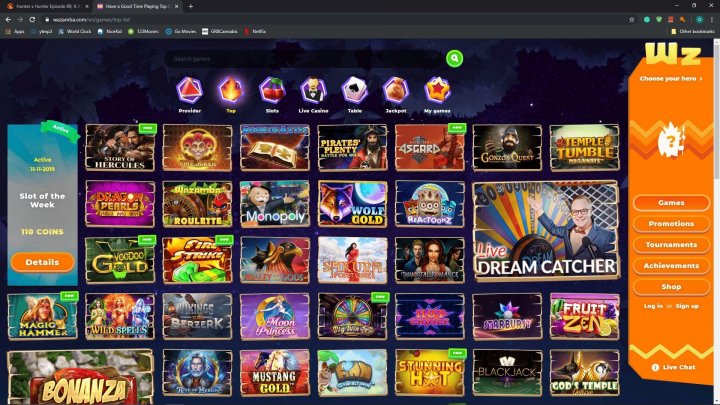
The game collection uses a arrangement of large, premium thumbnails that load progressively, letting you browse even on slower internet. Quick tabs for slot games, live casino, table games, and jackpots are placed at the top, and you can swipe horizontally to get a preview of each section. A robust filtering tool enables sorting by developer, trending, or alphabetical order. The developer filter enables choosing multiple, so you can see games from various studios at once—a small but meaningful touch that many apps lack. Each game thumbnail reveals a brief description, volatility level, and minimum wager range via a long press, eliminating the hassle of opening a game only to discover it’s not right. Live gaming tables display real‑time dealer avatars and seat availability, helping you choose a seat.
A bookmark system, marked by a heart icon, lets you bookmark games, and the collection syncs with your profile on different devices. The transition from lobby to game is seamless, with a quick loading animation that hides initialization. Once within a game, a subtle floating button takes you back to the lobby right away, preventing a difficult exit. This entire process—from looking to playing to coming back—shows polished interface design. The app also showcases touch‑optimized games and portrait‑mode slots prominently, making sure the mobile experience feels native rather than a shrunk desktop version.
Account Handling and Cashier Operations
The cashier section emphasizes transparency with distinct tabs for deposits, withdrawals, and transaction history. The deposit screen displays offered payment methods with defined minimum and maximum limits, processing times, and any fees. Selecting a method opens a simple form that uses numeric keyboards for amount entry, minimizing errors. The app supports cards, e‑wallets, prepaid vouchers, and cryptocurrencies where permitted. After a completed deposit, your balance updates immediately, and a push notification verifies the transaction. The withdrawal flow verifies your verification status and prompts you to complete any missing KYC steps before allowing a cashout, preventing later delays. You can store frequently used methods, but security credentials are mandatory for sensitive actions.
The transaction history is sortable by date and type, with expandable entries showing full details including transaction IDs. The profile section allows you to update personal details, set communication preferences, and configure responsible gaming tools. Self‑exclusion and limit‑setting controls are shown in plain language with immediate confirmation, eliminating ambiguity. This directness assists players make informed decisions. Overall, the cashier interface appears a secure financial tool rather than an afterthought, creating trust in the platform.
Key Differences from the Desktop Experience
The mobile app compresses the desktop’s broad navigation into a bottom bar, forming a more direct browsing path that fits focused play. Hover‑based interactions are replaced by tap‑and‑hold or swipe gestures; for example, game previews appear on long press instead of mouse hover. The app runs one game at a time, unlike desktop where multiple browser tabs are feasible, which reduces confusion and resource drain. The cashier and account sections use a step‑by‑step wizard with larger form fields, cutting down on input errors on smaller keyboards. Push notifications take the place of email alerts for promotions and account activity, with conservative default settings that you can customise.
Live chat support blends as an overlay within the app, maintaining you inside the ecosystem rather than launching a new window. While the core game library is identical, the mobile interface highlights touch‑optimised titles and portrait‑mode slots more prominently. The app does not seek to copy the desktop experience inch for inch; it constructs a parallel interface that acknowledges mobile constraints and advantages, resulting in a separate but equally capable product. This considered adaptation guarantees that the mobile experience feels native and not merely a shrunken website.
FAQ
Does the Wazamba Casino app cost anything to download?
Indeed, the Wazamba Casino app is entirely free to download on both Android and iOS devices. No cost is associated with the installation file or accessing the app’s features. You will only need to deposit funds if you wish to play real‑money games, but browsing the lobby and trying demo versions of games does not require any payment. Always download the app from the official Wazamba website or the Apple App Store to avoid counterfeit versions that may request payment.
What devices and operating systems work with the app?
The Wazamba app works with a large selection of contemporary smartphones and tablets. For Android, devices running version 8.0 or later are compatible, covering most models released from 2017 onward. iOS users require version 12.0 or higher, which covers the iPhone 6s and later, along with compatible iPad models. It is advisable to keep your operating system updated to the newest version to guarantee the best performance, security, and access to all interface features without compatibility problems.
How can I update the Wazamba Casino app to the most recent version?
Refreshing the app is designed to be seamless. On Android, when a new version is ready, the app will present a notification upon launch prompting you to download the updated APK file. Simply follow the on‑screen link to the official site and install it over the existing version. For iOS, updates are handled through the App Store’s standard update mechanism. In both cases, your login credentials, favourites, and account balance are kept, and the update process typically takes less than a minute to complete.
Is it possible to use the same account on the app and the desktop site?
Absolutely. Your Wazamba Casino account is unified across all platforms. You can open an account on the desktop site and log into the app with the same credentials, or vice versa. Your balance, transaction history, game favourites, and responsible gaming settings update in real time. This implies you can start a gaming session on your computer and pick up right where you left off on your mobile device, with no need to transfer funds between separate accounts.
Is the mobile app as secure as the desktop website?
The mobile app utilizes comparable high‑level security measures to the desktop platform. All information transmitted between the app and Wazamba’s servers gets encrypted using TLS protocols, securing your personal and financial information. The application also enables biometric login methods like fingerprint and face recognition on devices that provide them, adding an extra layer of security. Routine security checks and compliance with industry standards guarantee that the application provides a safe environment for your gaming activities.